


Integrate Apex Trading With Bridge Nexus
Last updated: Nov 02, 2026
16
views

Apex Trading Integration
What it is: A connection between your Apex Trading account and your Bridge Nexus account via a pairing code flow, used to import buyers (stores), products, and orders — and to push orders into Apex.
How it works:
- Generate a pairing code in Apex (Settings → Integrations → connect Headset)
- Enter that code in Headset (Nexus → Settings → Integrations → Apex)
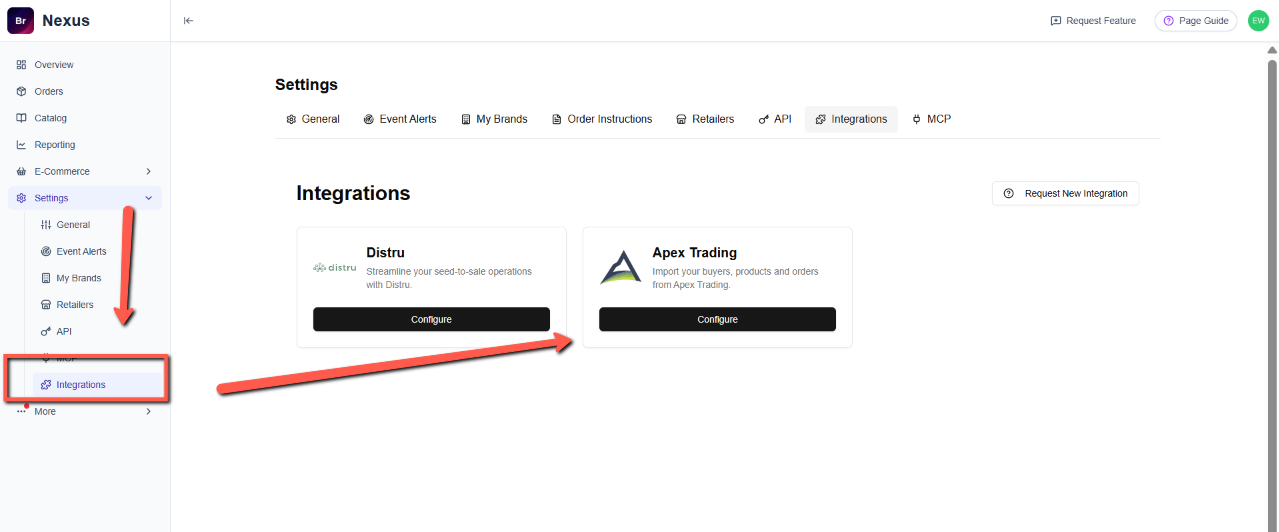
- Headset exchanges the code with Apex's API for a connection token
- Once connected, Headset can:
- Import buyers, products, and orders from Apex
- Push orders into Apex (Apex uses a cart → convert flow: items go into a cart, then the cart is converted into one or more orders)
What you need:
- An Apex Trading account
- A Headset account (Nexus)
Setup steps for the customer:
- Log in to app.apextrading.com
- Go to Settings → Integrations
- Connect Headset to generate a pairing code
- Copy the code
- Log in to Headset, go to Settings → Integrations → Apex Trading
- Paste the pairing code and click Connect to Apex
- Optionally click Test Connection to verify
Important notes for Apex:
- Pairing codes expire after 7 days — if expired, you will need to generate a new one
- Codes are single-use — if a code was already redeemed but the token wasn't saved, you will be prompted to "issue a replacement" (which invalidates any previously issued token for that connection)

